
Check on your agents from your phone
You left three agents working and went out. Is one of them waiting for a yes? Once you set it up, Aubergine can be opened in a phone's browser: the same page and the same terminals, each device paired with a one-time code.
What has been tried, and what not. Use from another device was run once, on 22 November 2026: the container setup in docker/ on one Mac, with Caddy in front under https://aubergine.localhost and Chromium on the same Mac, which paired with a code, typed into terminals and was signed out when its device was revoked. Not tried: a real phone, scanning the QR code with one, a real name with a public certificate, a private network, a cloud machine, two separate machines. The page is not laid out for a phone's width. The rest comes from the code and its tests. Take this as something to try, not something promised.
What people usually do
An SSH app on the phone, into the computer, then tmux attach to the session an agent runs in. Or a tunnel, or a private network that makes the computer reachable from the phone. Both work; checking several agents that way means attaching to each in turn on a small keyboard.
What Aubergine does
It is off by default, and stays bound to this computer. The server listens on 127.0.0.1 only, and that does not change. Something on the same computer carries HTTPS to it under a name, such as a private network's own HTTPS serving or a web server like Caddy. Aubergine never speaks HTTPS itself.
You write the address in the settings. It goes under access.addresses in config.json, and is read when the server starts; no page or program can change it. aubergine doctor lists the addresses and what is wrong with any.
Each device is paired with a one-time code. aubergine device add --name "Phone" at the computer, or Settings → Devices → Add a device in a signed-in browser, shows a code and, for each address, a QR code of a link with the code in it. Scan it, open the link, or type the code on the phone's sign-in page. A code works once, for three minutes.
A device can be revoked. aubergine device revoke "Phone", or Revoke… under Settings → Devices, signs it out at once and closes what it has open. A device not used for 90 days stops working.
A paired device is the whole owner. It can do everything you can at the computer: every terminal, so a shell on that computer as you. Pair only browsers you would hand your keyboard to. What acts on the computer's own desktop, Open on desktop, is left out of the page there and refused.
What you would see
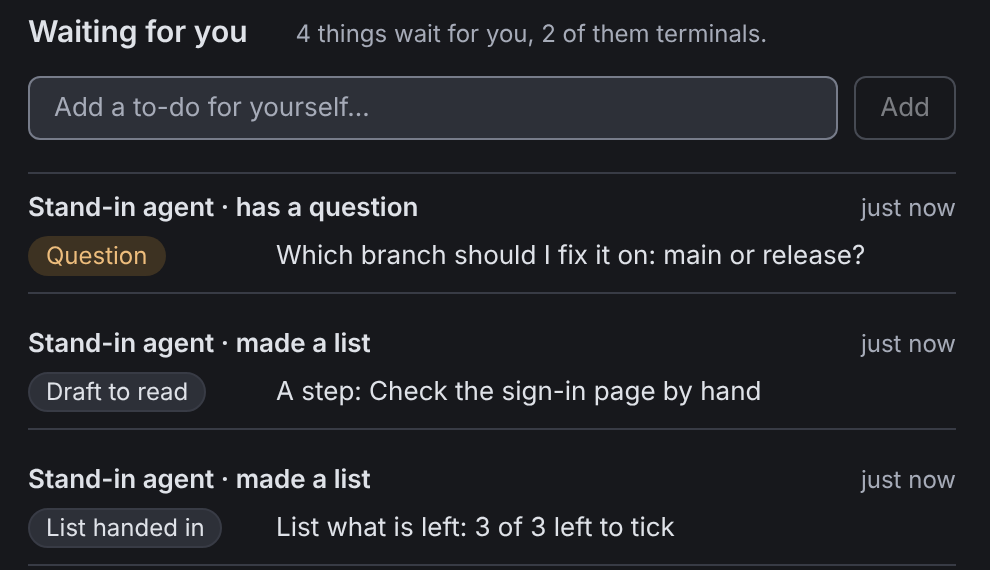
The same page as at the computer: the canvas and its terminals, the count beside For you and the list of what waits, and one terminal by itself at /t/<terminal> with its details and its note. It is not laid out for a phone; it works as it does in a narrow window.
The three ways to set it up (an SSH tunnel, a private network, a name of your own and a proxy), pairing, and what to do when it does not work are in Using Aubergine from elsewhere. An SSH tunnel needs no settings at all, and is awkward on a phone.
What it does not do
- No app and no push. It is a page in the phone's browser, up to date while it is open. Nothing is sent to a phone whose page is closed.
- No answer from a sleeping laptop. With the server on a laptop, the phone reaches it only while the laptop is awake. A machine that stays on is the other choice.
- No protection for an address anyone can open. Without a code nobody gets in, and codes are hard to guess, but strangers would be guessing at a shell. Put a private network, or your organisation's own sign-in, in front of it, and never use a private network's mode that publishes a machine to the whole internet.
- No layout for a phone. The page works as in a narrow window. Reading a terminal and answering a question work that way; arranging a canvas is for a larger screen.
Questions
Can I check on my coding agents from my phone?
Once Aubergine is reachable over HTTPS and the phone's browser is paired, the phone shows the same page: which terminal waits, the list of what waits, and each terminal. It has been run with a browser on the same Mac, not yet on a real phone.
How do I pair my phone with Aubergine?
Run aubergine device add --name "Phone" at the computer, or use Settings → Devices → Add a device. Scan the QR code, open the link, or type the code on the phone's sign-in page within three minutes.
What if I lose my phone?
Revoke it at the computer: aubergine device revoke "Phone", or Revoke… under Settings → Devices. It is signed out at once, and what it had open is closed.
Is it safe to put Aubergine on the internet?
An address anyone can open puts the sign-in in front of everyone, and a paired device has a shell on your computer. Prefer a private network, or your organisation's own sign-in in front of the address.
Does it work when my laptop is asleep?
No. A sleeping laptop answers nothing, and its terminals pause until it wakes. To reach agents at any hour, the server has to run on a machine that stays awake.
Related: Know when Claude Code is waiting · Keep a process running · Security and privacy
Up and running in five minutes
You need macOS with tmux 3.2 or newer and Node.js 22 or newer. brew install tmux node gets both.
npm install -g @meatgarden/aubergine