The queue, “For you” and schedules
Two lists that feed each other: the queue holds work for agents, and For you holds everything that waits on a person. Schedules add tasks to the queue at set times.
The queue
Open Runs at the top of the page (or press Q) and click Add task. A task has a title, what to do, and optionally a folder, a workflow, and who may take it. By default any terminal where an agent is free may take it; you can name one terminal, or have a new agent terminal started for it, in a working copy of its own where the folder is in a repository.
- Start next starts the first task that someone can take now. A plain shell is never given a task.
- At most N at once, three unless you change it. Hold stops new starts and touches nothing that is running.
- Start by itself is off until you switch it on. Nothing checks on a timer.
- The order is yours: drag a task, or use the arrow keys.
- A task follows its run: needs you while a run waits for approval, done when it finishes, failed with a sentence when it stops. Nothing is tried again by itself.
For you
Terminals with a question, runs to approve or blocked, drafts and installs to read, tasks proposed for the queue, finished and failed tasks, lists an agent handed in, and working copies whose terminal is gone. The count beside For you at the top and “next waiting” are the same list. Most of it is gathered, not written: an item goes when the thing itself is done.
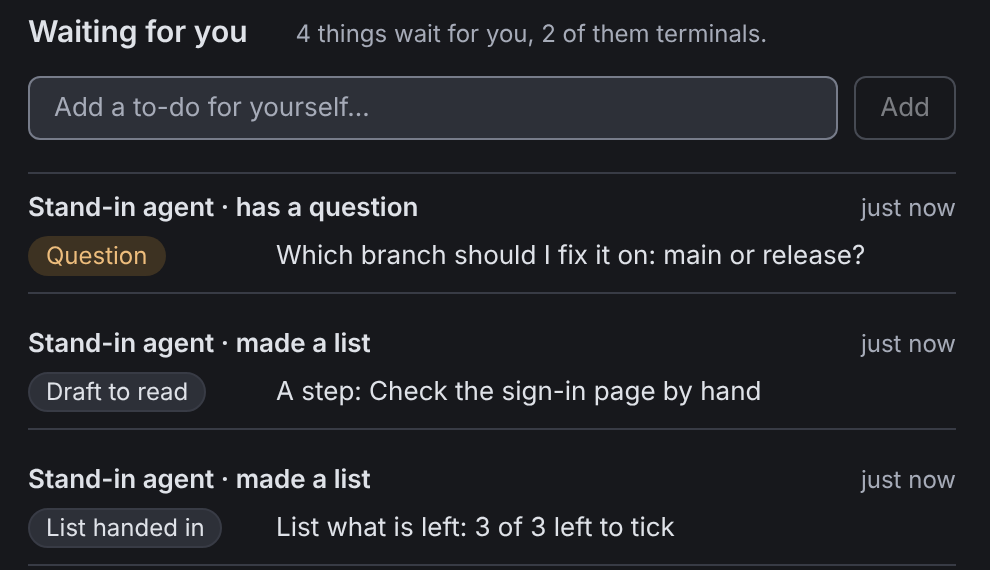
An agent that finds work it should not do now can propose a task, and one that needs a person can ask you:
aubergine task add "Add a test for the retry" --details "it should fail without the fix"
aubergine ask "the staging key expires this week: rotate it, or say who can"
Both land on your list. A proposal starts nothing until you accept it.
Schedules
A schedule is a time of day, days of the week, something to run and somewhere to run it. When its time comes it adds one task to the queue, and the queue starts it. Under Schedules on the Runs page, or aubergine schedule. The time is on this computer's clock; there are no expressions and nothing more often than once a day.
aubergine schedule add "My morning list" --at 08:30 --days weekdays \
  --element "Morning list" --new Main
aubergine schedule run "My morning list"
aubergine schedule run tries a schedule now.
When things are not as planned
- The computer must be awake and Aubergine running. A time that passed while it slept runs once when it is back, marked late, if it is under six hours old. Otherwise it is marked missed.
- While the previous task of a schedule still waits or is at work, it does not add another, and says it was skipped.
- If something it names is gone (the terminal, the step, the canvas), it does not run, and one item on your list says so.
Rules
Under Rules, you can say “when a task is done, failed or needs me, or a schedule fired or was missed, then notify me or run a saved step”. Rules are yours alone to write: no program and no agent can add or change one, and a rule cannot set itself off.
Aubergine calls no model and holds no credential for any app. A task or schedule only starts a run; the agent that takes it does the work with its own tools.
Related: working copies · run several coding agents at once
Up and running in five minutes
You need macOS with tmux 3.2 or newer and Node.js 22 or newer. brew install tmux node gets both.
npm install -g @meatgarden/aubergine